Skip to content

v0.1.0 · Linux · Windows · macOS

Track your hours. Keep the file.

A desktop time tracker that runs entirely offline. No account, no cloud, no subscription — every second you track lives in one SQLite file on your own machine.

  • No account
  • No telemetry
  • Works offline
Active timers Today 0h00
    Nothing logged yet
      Live demo. Elapsed time is derived from timestamps, exactly like the app — so it stays right across tabs, restarts and sleep.

      The real app, with demo data.

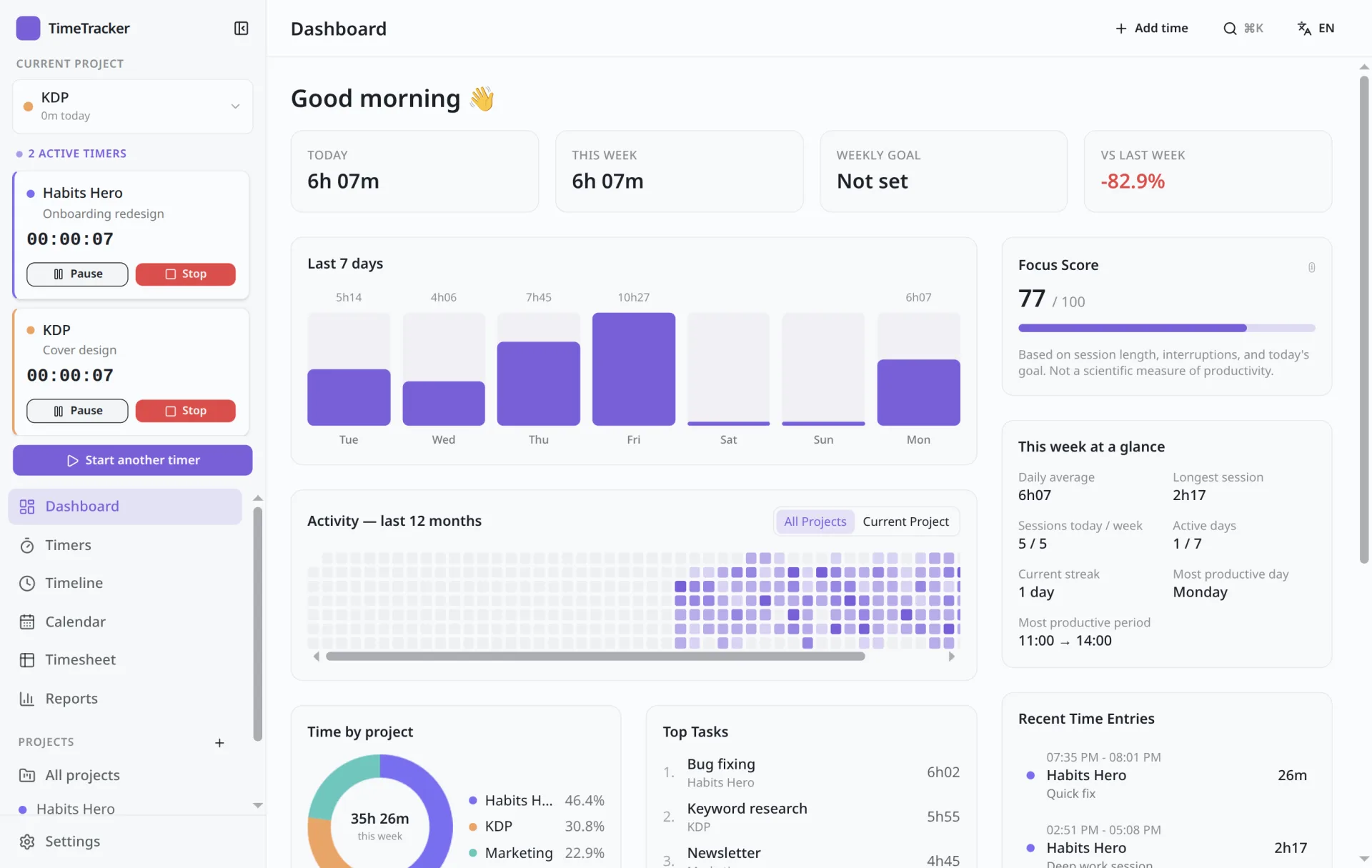
      Screenshots of TimeTracker 0.1.0 filled with six months of generated entries. Nothing here is a mock-up.

      What a day of tracking actually looks like.

      Idle time never silently disappears.

      Step away, or let the laptop sleep while a timer runs, and TimeTracker asks what to do with the gap before it changes anything.

      Idle detected · 10:42 → 11:05

      You were away for 23 min while “Homepage layout” was running.

      Type durations the way you think.

      The weekly timesheet reads 2h30, 1:30, 90m or 2.5 — all parsed the same way. Last week can be duplicated in one click. Try a cell.

      Project
      Total

      See where the year went.

      A 12-month heatmap, a 7-day chart, the split between projects, and a Focus Score that explains how it was computed — all calculated locally from your own history.

      Last 12 months

      Sample data

      Less More

      Also in the box

      Command palette

      Search projects, tasks, entries and tags at once, and get a suggestion for what to start next.

      ac CtrlK

      Results

      • Acme · Homepage layoutTask
      • Acme · Client callTask
      • AcmeProject
      Suggested next: Admin · Invoices — you usually start it around 9:00.

      Global shortcut

      Start or stop the last timer from any app, even when TimeTracker isn't focused.

      Timer started · Acme

      Tray & mini timer

      Start, pause and stop from the system tray or a small always-on-top window.

      Acme · Homepage layout 01:12:08

      Always on top

      Projects & tasks

      Hourly rates, weekly targets and budgets, subtasks to any depth, folders and tags.

      Acme · Website 32h / 40h

      Budget · 80%

      Weekly target 9h / 15h
      • Homepage layout
      • Hero section
      • Pricing table
      • Mobile layout
      • Client call
      #billable#design#client

      Timeline & calendar

      Day, week and month views. Entries that cross midnight are split correctly.

      Mon · 50m 23:10 → 00:40 Tue · 40m

      Reports

      Group by project, task, day, week, month or tag, and compare with the previous period.

      Manual entries

      Log time after the fact. Overlaps with existing entries are flagged before saving.

      Overlaps “Client call” by 15 min

      English & français

      The interface, the tray menu and notifications. Switch in Settings.

      ENFR

      Your data is one file.

      No server to trust and no export to request. Your history is a SQLite database you can open, copy, back up and query yourself.

      • Automatic daily or weekly backups, pruned for you.
      • Restoring takes a safety backup first.
      • JSON and CSV export whenever you want a copy.
      • No telemetry, no sign-in, no network needed.

      Download TimeTracker

      Version 0.1.0. One installer per platform, no sign-up screen in between.

      Linux

      AppImage · .deb

      Download for Linux

      Windows

      Installer · .exe

      Download for Windows

      macOS

      Disk image · .dmg

      Download for macOS

      Builds aren't code-signed yet, so Windows SmartScreen and macOS Gatekeeper will ask you to confirm the first launch.

      Or build it yourself

      Needs Node and pnpm. Swap linux for win or mac.

      git clone https://github.com/juliendu11/time-tracking.git
      cd time-tracking
      pnpm install
      pnpm run package:linux

      Straight answers

      Do I need an account?

      No. Install it and start a timer. There is no sign-up, no login and no licence key.

      Can I sync between two computers?

      Not automatically — there is no cloud. You can move a backup file to another machine and restore it there.

      What if my laptop sleeps with a timer running?

      When you're back, TimeTracker shows the gap and lets you remove it, keep it or split the session. Nothing is changed until you choose.

      Can I run more than one timer?

      Yes. Each timer is independent: pausing or stopping one never touches the others.

      Is there a mobile app?

      No. TimeTracker is a desktop app for Linux, Windows and macOS.